
Charging and BMS test software
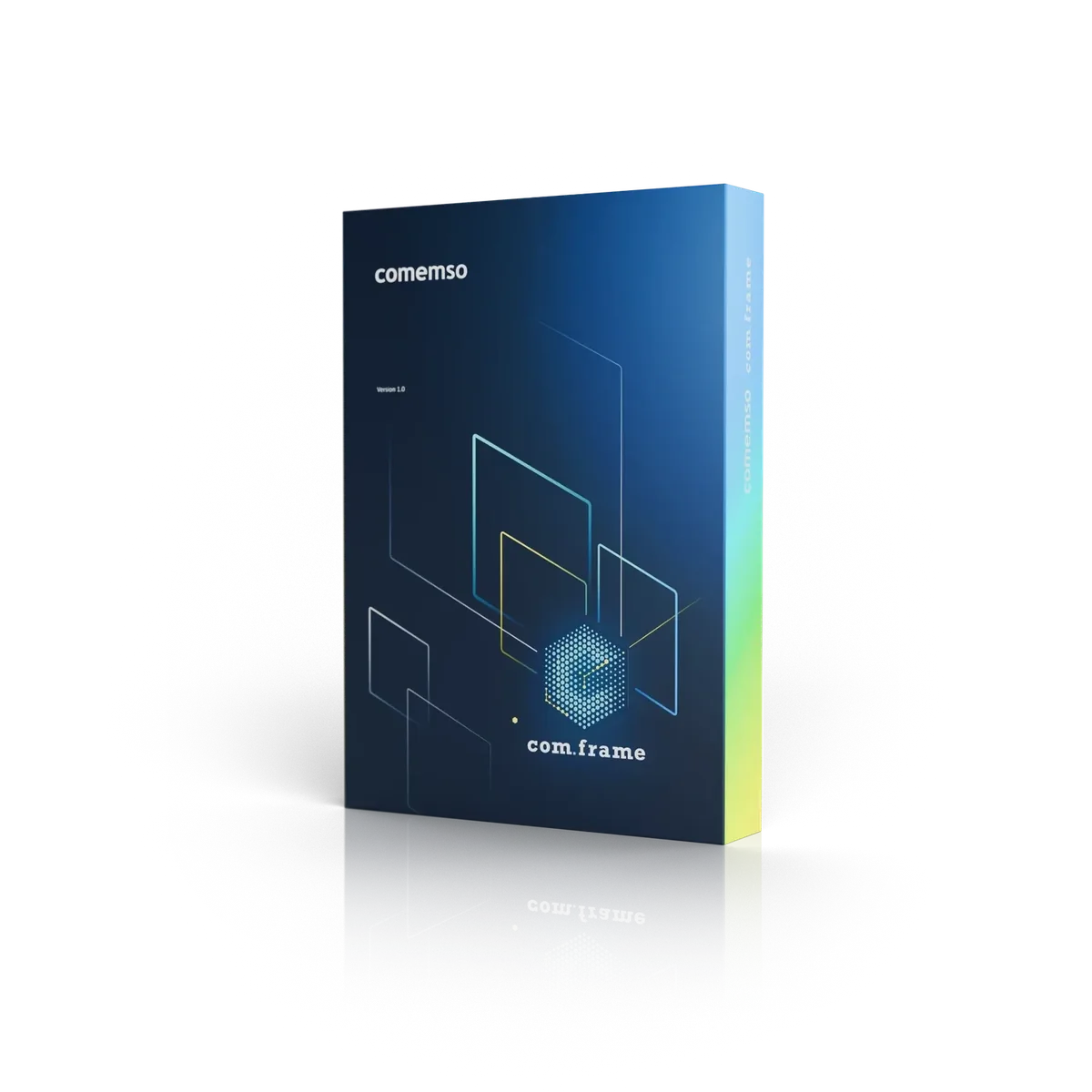
comframe: charging expertise in your daily test workflow
Bring charging expertise into your daily test workflow with comframe: configure charging, calibration and battery management system (BMS) tests. Review the deviations highlighted by the software and investigate the response with Professional Simulation. ISO 15118-4/-5 SECC TestLibs are already available.
The comframe workspace
Simple to use. Powerful in the details.
Arrange the workspace around your test task. Use simple window controls to keep the relevant functions in view and open the technical detail when you need it.
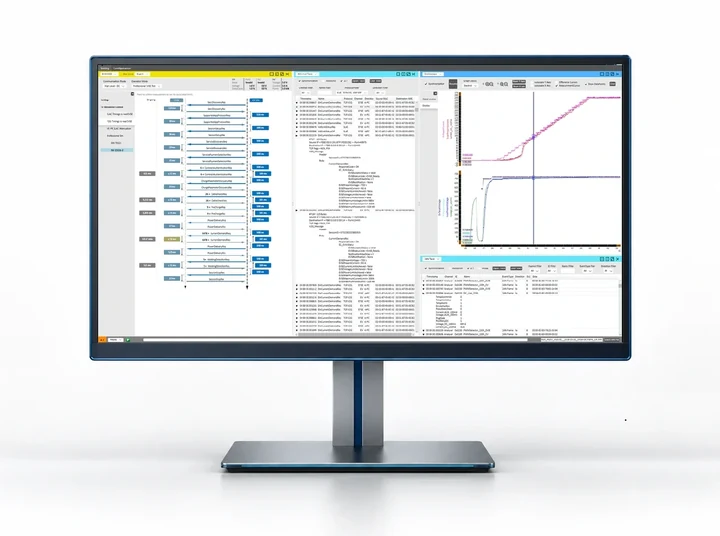
- 1Partner request: charging-message sequence.
- 2Device response: synchronised voltage and current traces.
- 3Result record: decoded messages and event data.
One software framework for connected test applications.
Use the same workspace with the test system your task requires.
Use comframe to develop and validate EV charging, interoperability, EVSE calibration and battery management systems. Work in a consistent workspace with your supported EVCA, Calimera or Battery Cell Simulator (BCS) configuration.
EV, EVSE, interoperability, high-power, MCS and communication-focused test systems.
Mobile calibration and metrological verification at the charging station.
Cell, sensor, balancing, isolation and fault scenarios for BMS validation.
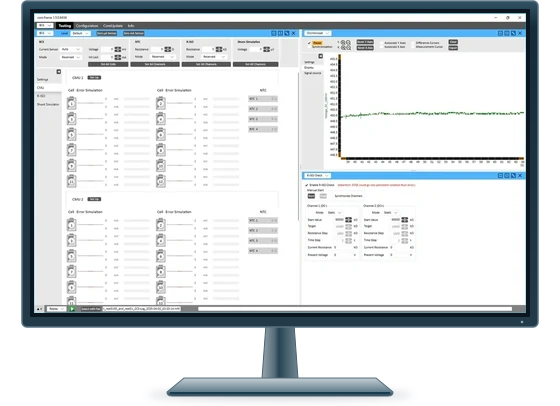
- Test requirement: cell and sensor setpoints and measurement data.
- Response: the measured signal in the oscilloscope view.
- Fault Injection: configure isolation faults between DC+ and PE and DC- and PE for IMD test

Purpose-built software
Application knowledge built into the workflow.
Configure the device role and test conditions, then review messages and measured signals together. Save the configuration, measurements and report so colleagues can review the same run.
Projects & configurations
Keep the DUT, role, standards, behaviour, enabled functions and result requirements in the project configuration.
Synchronised data
Correlate protocol, low-level states, traces, measurements and relevant electrical behaviour on one time base.
Visualization & reports
Review measurements and highlighted deviations in views suited to the test task. Link the outputs to the run that produced them.
Automation & interfaces
Reuse approved configurations in cycles, campaigns, production processes and external orchestration.
Set up a workspace and share it with your team.
Arrange views in a few clicks, resize them proportionally and save the layout. Share the view configuration with colleagues so they can load the same workspace directly.
Arrange views for the task
Arrange messages, measurements, controls and results together. Move and resize the views to suit the current test.
Set up CAN and Ethernet directly
Configure the supported CAN and Ethernet hardware in the application workflow, with the settings needed to connect your test equipment.
Live and logging controls remain visible
See and change the live/logging mode with the compact controls at the bottom left of the workspace.
Decide what to keep after the charging stop
After a charging stop, comframe asks whether to keep the measurement. If you do not respond within the timeout, it saves automatically. The file name includes context from the activity to help identify the recording.
Shared software core and application-specific logic
Shared software core with charging and BMS modules
The generic core keeps projects, synchronised data, visualization, reports, automation and interfaces consistent. Domain modules add the engineering context for CCS and NACS paths, CHAdeMO, GB/T, MCS and BMS. Supported systems include EVCA, Calimera and Battery Cell Simulator.

One platform. Three charging perspectives.
Measuring, analysing and testing across real-pair, EV and EVSE workflows.
Applicable EVCA configurations use the same software environment whether the engineer observes two real charging partners, tests an EV against an EVSE (electric vehicle supply equipment, or charging station) simulation or tests an EVSE against an EV simulation.
Analysis, simulation and automation
comframe functions for your test workflow.
Relate measured values, timings, states and messages to normative expectations and highlight meaningful deviations.
Configure supported message content, timing, optional communication and exceptional behaviour without developing the complete test environment.
Modify selected communication between a real EV and real EVSE to investigate a root-cause hypothesis during charging.
Import supported recordings into comframe for analysis now. Replaying recorded EV behaviour as an EV simulation with Charge Playback in comframe is planned for Q1/2027.
Sequence saved configurations into repeatable cycles, campaigns, regression runs and production workflows.
Execute released test logic for a defined standard, edition, DUT role and validated or approved scope.
Released in comframe
From SECC test selection to a documented result.
Use the ISO 15118-4 and ISO 15118-5 TestLibs for AC and DC EVSE communication in comframe. Compare the Test Library scope and software status with your DUT features and EVCA configuration to identify the applicable test cases.
Use PICS to describe supported features and PIXIT to set the parameters required for execution.
Select the test cases that apply to the DUT and the released test-library package.
Execute the selected tests in comframe and inspect the automatic evaluation alongside the recorded communication.
Use individual test-case reports to review the result and document the test results.
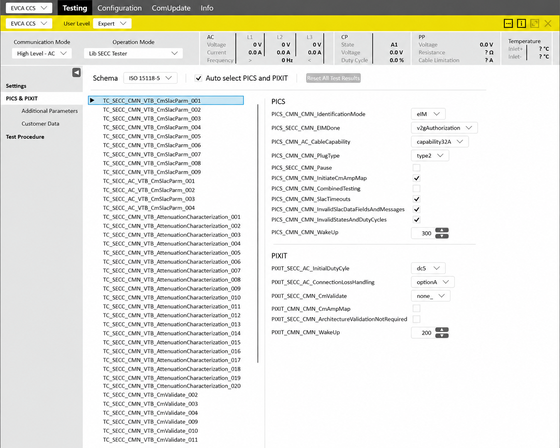
- Test requirement: selected case, PICS and PIXIT.
- Device state: live CP, PP, AC/DC voltage & current values as well as temperature in the status bar.
- Result workflow: Test Procedure; no verdict is visible in this capture.
Integration & APIs
Run tests in comframe and connect external systems through released interfaces.
Match integration depth to your engineering process. External systems can coordinate the implemented charging or BMS workflow while the application logic stays in comframe.
Native comframe workflow
Configure, run, analyse and document the test directly in comframe for engineering work and controlled manual operation.
REST API orchestration
Use released interfaces to select approved configurations, trigger workflows and monitor defined states. Retrieve results linked to the test; Python applications can act as REST clients.
Project-specific integration
Connect applicable HiL systems, test benches, CI/CD pipelines, external power or measurement equipment and quality systems. Define responsibility for control and safety at each interface.
- DUT identity
- Configuration
- Software and module version
- Measurements
- Verdicts
- Reports and exports
Versioned delivery
Specify the software release and configuration for your project.
Existing recordings and planned extensions
Analyse existing measurement recordings
Available now: use the recording import in comframe to analyse supported measurement files.
Planned for Q1/2027: replay recorded EV behaviour as an EV simulation with Charge Playback in comframe. The remaining CCS TestLibs are targeted for the end of 2026, with Q1/2027 allowed if validation takes longer.
IEC 61851-23: the comemso TestLib has been demonstrated. Its port to comframe is prepared; a comframe release is not yet available.
See the current IEC test setupSupport for importing EV DBC files for EV-CAN data and for LIN data is planned during 2027. The released version defines which integrations you can use today.
FAQ
Frequently asked questions
What is comframe?
comframe is the software environment for supported comemso EV charging, calibration and BMS systems. It connects test configuration, synchronised measurement, analysis, simulation, automation, reports and supported integration in one workspace.
Why is the user interface described as highly flexible?
Arrange supported views and panels for the current task, synchronise data on one time base, filter it and retain the workspace with the project. The released version defines the available layout functions.
Does comframe support different languages?
comframe provides a language-selectable user interface for international teams. The available languages are defined by the current released software version and product configuration.
Which products use comframe?
comframe is used with supported EVCA and Calimera configurations and provides an optional control path for the Battery Cell Simulator. Exact compatibility and function depth depend on the selected product, software release and licence.
Does comframe support REST API and Python integration?
A REST API is part of the published comframe baseline. Python applications can use released REST interfaces as clients. Exact endpoints, authentication, hardware control and result access remain release and project specific.
Are all functions available on every system?
No. Modules, protocol editions, capabilities, languages, APIs and hardware control are versioned and licensed. The current proposal and release documentation define the delivered scope.
Customer projects, success stories and technical articles related to this page.
- Success storyTexas Instruments: precise cell-level BMS testingMark Ng from Texas Instruments describes precise cell-level testing with the comemso Battery Cell Simulator.
- Success storyAalborg University: battery research with comemsoProf. Dr. Remus Teodorescu on the comemso Battery Cell Simulator in research, with the Aalborg COMEMSO-platform video.
- Customer project204-Cell BMS Test Bench with CANoeA truck and bus manufacturer integrates a 204-cell BMS test bench with 16 NTC channels, insulation monitoring tests and fault simulation into CANoe.
- Customer projectBMS Testing with Open InterfacesA battery research team combines Battery Cell Simulation and comframe with its own test software, using open interfaces for BMS development.
- Customer projectBMS Testing with 120 Simulated CellsBattery Cell Simulator setup with 120 simulated cells, 24 temperature channels, isolation testing and fault insertion for repeatable BMS tests in one rack.
- Customer project204-Cell Battery Simulator for BMS Testing204-cell Battery Cell Simulator for BMS tests: temperature inputs, isolation faults, CAN/EtherCAT monitoring and safety-linked DUT drawers.
- Customer projectCustom BMS Validation Project, May 2024200-cell Battery Cell Simulator for BMS validation: customer-specific cell simulation, fault scenarios and integration with expanding production.
- Product newsBattery Cell Simulator: voltage oscillationBattery Cell Simulator Advanced for BMS testing: 7.5 A per cell, 1500 V stacks and Voltage Oscillation from 1 to 1000 Hz. Release context: 2022.
- Product newscomframe 1.1: Simulation, Gateway and EOLThe July 2025 comframe release added more control over protocol simulation, bidirectional message manipulation and AC/DC end-of-line testing.
- Product newscomframe ISO 15118-4/-5 EVSE Test LibrariesISO 15118-4 and ISO 15118-5 EVSE communication tests in comframe: AC/DC, PICS/PIXIT configuration and a report for each test case.
Customer experience with the Battery Cell Simulator and EVCA platform, respectively.
“The flexible simulation of real-world battery conditions with the comemso BCS allows us to automatically test different real-life scenarios from our customers of grid, automotive, and transportation area and identify & eliminate safety-critical factors to improve performance at an early stage.”
“The charging specialists at umlaut use the comemso EV Charging Analyzer in our EFECT lab at the Braunschweig site. Since our collaboration with comemso has been excellent for many years, umlaut has once again upgraded the EFECT with comemso hardware.”
Test workflow and integration
Specify the application module, released interfaces, control model and result exchange for your workflow.