
Test methods across the portfolio
Observe, simulate and analyse charging behaviour
Observe and record a real charging session, reproduce a charging partner, change a message or repeat a test series. Choose the capability for your task and see how it works.
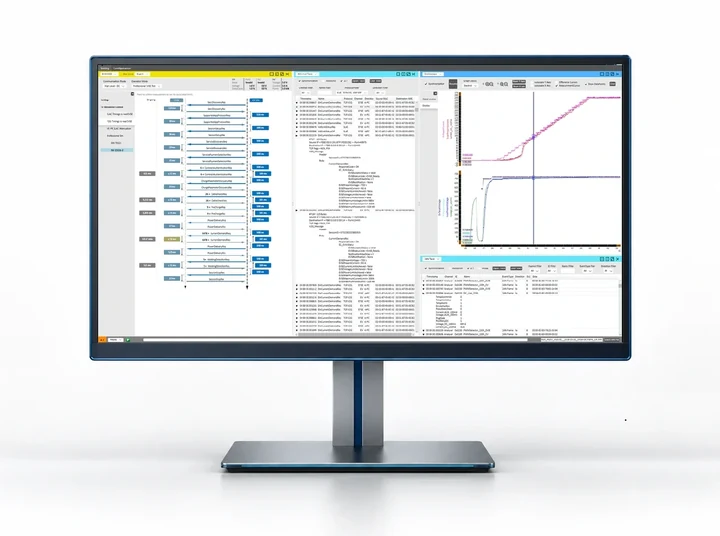
- 1Partner request: charging-message sequence.
- 2Device response: synchronised voltage and current traces.
- 3Result record: decoded messages and event data.
From test method to product
Six test methods across the product portfolio
Observation, simulation or analysis – the method follows your test. Each product brings the physical interfaces and released functions for your DUT (device under test) and configuration.
DUT role, interfaces, parameters, automation and results are defined before the hardware is chosen.
Explore comframeNominal, boundary and non-conform behaviour are tested within the released product and protocol scope.
Professional SimulationCommunication, low-level signals, power and application states share one time base.
Explore EVCAReleased evaluation functions compare measured behaviour with the applicable technical rules.
Automated Standards AnalysisVersioned test logic and controlled configurations give each verdict a defined scope.
Conformance Test LibrariesTest identifiers, measurements, decisions and reports stay together for development, release or production.
Charge Cycle AutomationThe product for your DUT
Apply the method to your test environment
Product, interface and control model follow your DUT. The required capabilities are confirmed for the selected configuration.
Analyses communication, simulates partners, measures responses, applies controlled faults and tests interoperability with released test logic.
Open the EVCA platformGuided workflows for EOL (end-of-line), commissioning, service, inspection and calibration, with the control model of the selected product.
Choose the Easy Chester roleSimulates cells, sensors and faults through an open interface. Integrates with an existing HiL (hardware-in-the-loop) environment or works with optional comframe software.
Open BMS testing solutionsKeeps charging communication observable across the chamber wall during EMC testing.
Open EMC LinkControl and integration
Choose software and interfaces for your operating environment
comframe handles engineering analysis and extensions with compatible EVCA, Calimera and Battery Cell Simulator configurations.
| Product path | Primary control model | Why it fits |
|---|---|---|
| EVCA products | comframe | EV charging tests are configured, synchronised measurements analysed, runs automated and results retained in one software environment. |
| Easy Chester Calimera | comframe | Guided calibration connects with traceable measurements and reporting. |
| Battery Cell Simulator | comframe or another HiL environment | Integrates through the open interface with the established automation architecture. comframe as an optional integrated workflow. |
| Easy Chester EOL / EOL HPC | RS-232 with SCPI commands | Integrates deterministically into the production line, with project-specific production-system extensions where required. |
| Easy Chester Ultimate | Standalone guided operation | The device runs directly through its guided workflow. Retrieve completed test reports through mobile access at any time. |
EVCA charging test capabilities
Explore the EVCA capabilities for your charging test
Explore Automated Standards Analysis, Professional Simulation, Manipulating Gateway, Charge Playback, Charge Cycle Automation and Conformance Test Libraries in the EVCA capability hub.
Frequently asked questions
EV Charging and BMS Testing Capabilities FAQ
How are test results documented?
Record the input configuration, applied stimulus, measured response and evaluation for the selected capability. Choose the available exports for the product, software release and workflow.
Capability scope